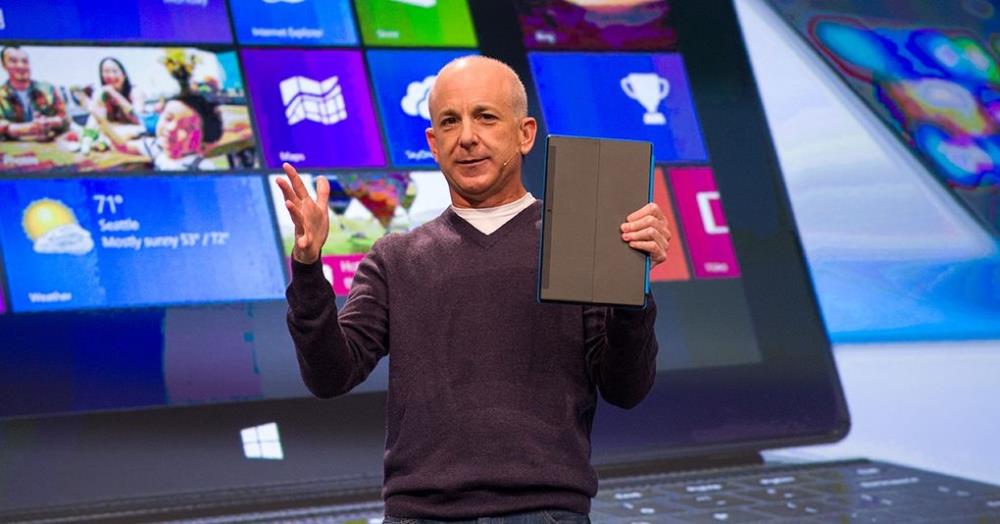
Adding 415 apps daily, Windows 8 blows past the 35,000 app milestone
The Next Web : Microsoft’s Windows 8 operating system now has a total of 35,0000 applications in its Store, according to tracking website MetroStore Scanner.
(Industry, Software, Web, Windows 8)
I finally got a chance to play with Win 8 at OfficeMax a while back. I'm glad i have a disk copy of Win7. The Win8 interface is too neon and tacky looking to me. Also, really cumbersome just to get things done. It seems the tiles are used for navigating menus (even from traditional desktop)and program settings. Also, i could not find how to access the control panel anywhere. Maybe it was blocked on the demo i tried but if it isn't allowed or is tedious to get to then fixing common windows problems IS NOT going to be fun.
Demo unit. Most likely not on there. The interfaces still seemed "clunky" to use though. I guess if you had a touch screen desktop it would be smoother.
thats your fault and not windows 8, why is everyone so lazy, everything you think is gone is one click away, you dont have to start with tiles, there are apps to start just like win7, to get all the control panels,run and other things you supposedly cant find, simply right click in the bottom left corner.
people are simply lazy these days and lie about win8, the tiles is a option so they move towards the app world just like everyone seems ok with when its on android and ios, but god forbid microsoft attempts it then many crap on it.
win8 is win7 but faster with some new features that are app based and a added interface. if you dont like that interface well you can use it juts like win7 .
RIGHT CLICK THE BOTTOM LEFT HAND CORNER FOR ALL YOUR MISSING OPTIONS, AND I MEAN ALL OF THEM FROM RUN, TO CONTROL PANEL, TO SEARCH AND COMPUTER AND SYSTEM AND PROGRAMS AND FILE EXPLORER AND EVERYTHING ELSE YOU ALL COMPLAIN ABOUT
Let me break it down to you CHILD/SHILL. I was trying a demo in a crowded store around Christmas. If i had hours to play around with THE FULL version those options might have been there or i would have found them. It still doesn't change the fact though that i am not impressed with a tacky, neon, interface that looks like something my niece would have on one of her "computer for kids" toys. The whole interface is meant for tablets and is being shoe-horned onto a desktop PC. If bright, shiny colored blocks on your desktop is your thing then by all means; enjoy your windows 8. I'll be sticking with Win 7 though.
the only child here is you who again doesn't realize what is in front of him, you ont have to see or use the tiles, it a dded feature, what dont you understand, bypass that and its windows 7, do you like windows 7, if so then windows 8 is the same, going on and on doesnt change the fact you dont have to deal with the parts that are meant for tablet or touch, its that simple, everything else is excuses.
http://techspy.com/news/114...
Yes!! Now window 9 will be awsome!
You're not the only one bro!
Cheers!
+1
Its easy. Its located in the charms bar on the right side.
people are simply lazy these days and lie about win8, the tiles is a option so they move towards the app world just like everyone seems ok with when its on android and ios, but god forbid microsoft attempts it then many crap on it.
win8 is win7 but faster with some new features that are app based and a added interface. if you dont like that interface well you can use it juts like win7 .
RIGHT CLICK THE BOTTOM LEFT HAND CORNER FOR ALL YOUR MISSING OPTIONS, AND I MEAN ALL OF THEM FROM RUN, TO CONTROL PANEL, TO SEARCH AND COMPUTER AND SYSTEM AND PROGRAMS AND FILE EXPLORER AND EVERYTHING ELSE YOU ALL COMPLAIN ABOUT